
My requirement is to reduce the size of MP3 or AAC encoded speech audio to at least 1/4th – 1/8th of the original file size. These source files are mostly sampled and encoded at 44.1KHz, 32bit per sample, 128kbps Constant Bit Rate (CBR). There are minimal (mostly none) musical elements in these videos, so that makes my task much easier. The tool of choice is ffmpeg which I am using for more than 15 years. The only question is which codec to use and what encoding parameters give the optimal file size and quality.
Nearly optimal solution – according to my own quality standards 🙂
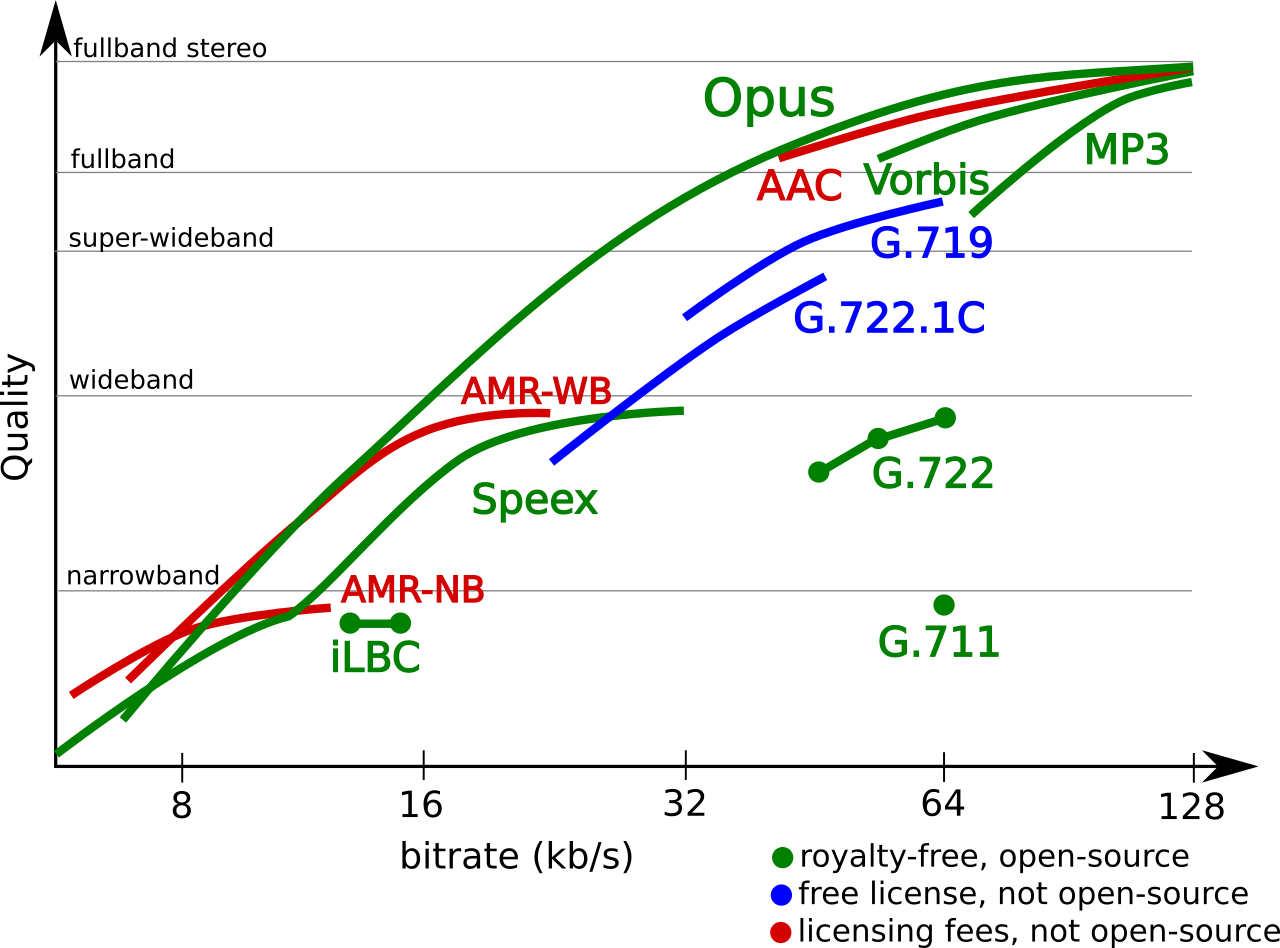
- Audio Codecs Comparison (image from http://opus-codec.org/comparison/)
As shown in the graph, MP3 is not really suited for narrowband speech encoding and I prefer opus than iLBC (past experience of working on iLBC codec ;).
In order to achieve 1/8th size reduction without seriously affecting the quality of source audio, after some search and experiments, I have arrived encoding at CBR (VBR is out of question since we have target size fixed) with these encoding parameters (in bold) for ffmpeg:
ffmpeg -i input.mp3 -c:a libopus -ac 1 -ar 16000 -b:a 8K -vbr constrained output.opus
If someone insist on using MP3 format, here is the encoding parameters used (in bold):
ffmpeg -i input.mp3 -acodec libmp3lame -b:a 8k -ac 1 -ar 11025 output.mp3
As a reference, from ffmpeg documentation:-
FFmpeg can encode to a wide variety of lossy audio formats. Here are some popular lossy formats with encoders listed that FFmpeg can use:
Dolby Digital: ac3
Dolby Digital Plus: eac3
MP2: libtwolame, mp2
Windows Media Audio 1: wmav1
Windows Media Audio 2: wmav2
AAC LC: libfdk_aac, aac
HE-AAC: libfdk_aac
Vorbis: libvorbis, vorbis
MP3: libmp3lame, libshine
Opus: libopus
Based on quality produced from high to low:
libopus > libvorbis >= libfdk_aac > aac > libmp3lame >= eac3/ac3 > libtwolame > vorbis > mp2 > wmav2/wmav1
For AAC-LC:
libfdk_aac > aac
The >= sign means greater or the same quality. This list is just a general guide and there may be cases where a codec listed to the right will perform better than one listed to the left at certain bitrates. The highest quality internal/native encoder available in FFmpeg without any external libraries is AAC. Please note it is not recommended to use the experimental vorbis for Vorbis encoding; use libvorbis instead. Also please note that wmav1 and wmav2 don’t seem to be able to reach transparency at any given bitrate.
Container formats
Only certain audio codecs will be able to fit in your target output file.
| Container | Audio formats supported |
| MKV/MKA | Vorbis, MP2, MP3, LC-AAC, HE-AAC, WMAv1, WMAv2, AC3, eAC3, Opus |
| MP4/M4A | MP2, MP3, LC-AAC, HE-AAC, AC3 |
| FLV/F4V | MP3, LC-AAC, HE-AAC |
| 3GP/3G2 | LC-AAC, HE-AAC |
| MPG | MP2, MP3 |
| PS/TS Stream | MP2, MP3, LC-AAC, HE-AAC, AC3 |
| M2TS | AC3, eAC3 |
| VOB | MP2, AC3 |
| RMVB | Vorbis, HE-AAC |
| WebM | Vorbis, Opus |
| OGG | Vorbis, Opus |
Please note that there are more container formats available than those listed above.
Recommended minimum bitrates to use
The bitrates listed here assume 2-channel stereo and a sample rate of 44.1kHz or 48kHz. Mono, speech, and quiet audio may require fewer bits.
- libopus Usable range >= 80Kbps. Recommended range >= 128Kbps
- libfdk_aac default AAC LC profile. Recommended range >= 128Kbps; see AAC Encoding Guide.
- libfdk_aac -profile:a aac_he_v2 Usable range <= 48Kbps CBR. Transparency: Does not reach transparency. Use AAC LC instead to achieve transparency
- libfdk_aac -profile:a aac_he Usable range >= 48Kbps and <= 80Kbps CBR. Transparency: Does not reach transparency. Use AAC LC instead to achieve transparency
- libvorbis Usable range >= 96Kbps. Recommended range -aq 4 (>= 128Kbps)
- libmp3lame Usable range >= 128Kbps. Recommended range -aq 2 (>= 192Kbps)
- ac3 or eac3 Usable range >= 160Kbps. Recommended range >= 160Kbps
Example of usage:
ffmpeg -i input.wav -c:a libfaac -q:a 330 -cutoff 15000 output.m4a
- aac Usable range >= 32Kbps (depending on profile and audio). Recommended range >= 128Kbps
Example of usage:ffmpeg -i input.wav output.m4a
- libtwolame Usable range >= 192Kbps. Recommended range >= 256Kbps
- mp2 Usable range >= 320Kbps. Recommended range >= 320Kbps
- The vorbis and wmav1/wmav2 encoders are not worth using.
- The wmav1/wmav2 encoder does not reach transparency at any bitrate.
- The vorbis encoder does not use the bitrate specified in FFmpeg. On some samples it does sound reasonable, but the bitrate is very high.
- To calculate the bitrate to use for multi-channel audio: (bitrate for stereo) x (channels / 2). Example for 5.1 (6 channels) Vorbis audio: 128Kbps x (6 / 2) = 384Kbps
- When compatibility with hardware players doesn’t matter then use libvorbis in a MKV container when libfdk_aac isn’t available.
- When compatibility with hardware players does matter then use libmp3lame or ac3 in a MP4/MKV container when libfdk_aac isn’t available.
- Transparency means the encoded audio sounds indistinguishable from the audio in the source file.
- Some codecs have a more efficient variable bitrate (VBR) mode which optimizes to a given, constant quality level rather than having variable quality at a given, constant bitrate (CBR). The info above is for CBR. VBR is more efficient than CBR but may not be as hardware-compatible.